> ## Documentation Index
> Fetch the complete documentation index at: https://docs.b-bot.space/llms.txt
> Use this file to discover all available pages before exploring further.
# AI Agents and Core Vocabulary
> Learn what an AI Agent is and how B-Bot Hub describes identity, behavior, capabilities, and access.
# AI Agents and Core Vocabulary
An **AI Agent** is a configured AI experience for a defined role. In the interface and documentation, it may also be called an **Agent**. The configuration gives the Agent a recognizable identity, instructions, optional capabilities, and a model.
An Agent is not automatically correct or autonomous. Its results depend on its instructions, model, available context, connected tools, and the quality of the user's request.
Older guides or API surfaces may still use **Expert** to refer to an AI Agent.
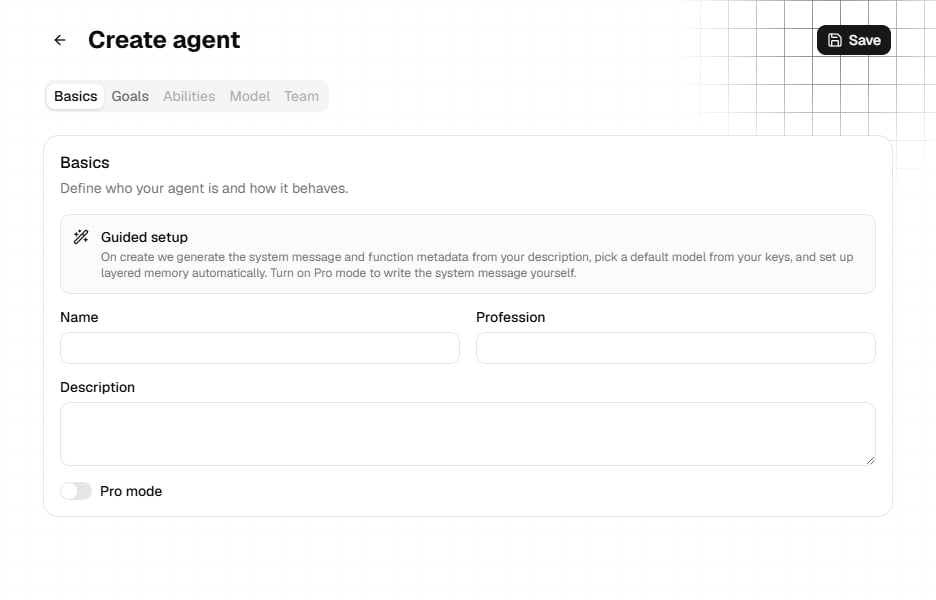 ## Agent Configuration
The name, profession, description, and profile image shown to users.
The system prompt and other guidance that define the role, priorities, tone, and boundaries.
The selected model and the configured forms of input or output, such as text, voice, images, or files.
Abilities, connected apps, knowledge sources, and team members that may be available to the Agent.
## Product Vocabulary
### Abilities
Abilities are reusable behavior instructions. They help users select a mode or approach for a conversation. Keep each ability focused and describe the expected behavior clearly.
### Templates
Templates are prepared prompts that help users start common tasks. They are examples of what to ask, not guarantees about the result.
### Knowledge
Knowledge sources provide information that an Agent can reference. Use them for material that must be maintained separately from the system prompt, such as product documentation or policies.
### Apps and Tools
Connected apps and tools can provide information or actions beyond the model itself. Their availability and permissions depend on how the Agent and the user's session are configured.
### Team
An Agent can be configured with other Agents as team members where that feature is available. Treat each team member as a specialist with a clear responsibility.
### Distribution Channels
**Distribution Channels** define how an Agent-based experience reaches users or systems. Channel configuration is separate from the Agent's core identity and behavior.
### DeepAgents
**DeepAgents** is a mode for multi-step work that uses tasks and workspace files. Human-in-the-loop controls can add review points before actions.
## A Useful Mental Model
```text theme={null}
Agent = identity + instructions + model + permitted capabilities
Experience = Agent + conversation settings + Distribution Channel
```
The same Agent may behave differently when the model, enabled tools, available context, or channel changes. Test the complete experience that users will receive.
## Next Steps
Learn how the configuration pieces fit together over time.
Follow the product guide to create your first Agent.
## Agent Configuration
The name, profession, description, and profile image shown to users.
The system prompt and other guidance that define the role, priorities, tone, and boundaries.
The selected model and the configured forms of input or output, such as text, voice, images, or files.
Abilities, connected apps, knowledge sources, and team members that may be available to the Agent.
## Product Vocabulary
### Abilities
Abilities are reusable behavior instructions. They help users select a mode or approach for a conversation. Keep each ability focused and describe the expected behavior clearly.
### Templates
Templates are prepared prompts that help users start common tasks. They are examples of what to ask, not guarantees about the result.
### Knowledge
Knowledge sources provide information that an Agent can reference. Use them for material that must be maintained separately from the system prompt, such as product documentation or policies.
### Apps and Tools
Connected apps and tools can provide information or actions beyond the model itself. Their availability and permissions depend on how the Agent and the user's session are configured.
### Team
An Agent can be configured with other Agents as team members where that feature is available. Treat each team member as a specialist with a clear responsibility.
### Distribution Channels
**Distribution Channels** define how an Agent-based experience reaches users or systems. Channel configuration is separate from the Agent's core identity and behavior.
### DeepAgents
**DeepAgents** is a mode for multi-step work that uses tasks and workspace files. Human-in-the-loop controls can add review points before actions.
## A Useful Mental Model
```text theme={null}
Agent = identity + instructions + model + permitted capabilities
Experience = Agent + conversation settings + Distribution Channel
```
The same Agent may behave differently when the model, enabled tools, available context, or channel changes. Test the complete experience that users will receive.
## Next Steps
Learn how the configuration pieces fit together over time.
Follow the product guide to create your first Agent.