> ## Documentation Index
> Fetch the complete documentation index at: https://docs.b-bot.space/llms.txt
> Use this file to discover all available pages before exploring further.
# Create an Agent
> Create an Agent from scratch or a template in B-Bot Hub
# Create an Agent
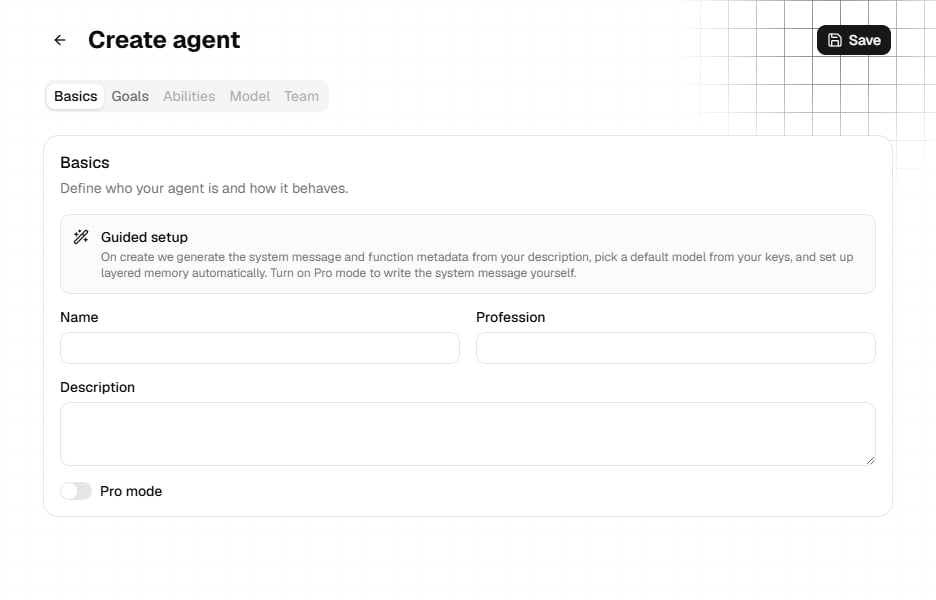
Open **Agents** in the sidebar and select **Create agent**, or choose **Create agent** in the agent selector. Both open `/agents/new`.
 ## Choose a starting point
* **From scratch:** Select **Create agent** and enter your own settings.
* **From a template:** On the Agents page, select **Browse templates**, filter the list, and choose **Use template**. Review every prefilled value before saving.
## Complete the initial setup
The new-agent page starts with **Basics** and **Goals**.
### Basics
* **Name:** Required.
* **Profession:** The role shown with the agent.
* **Description:** Required to be at least 50 characters for a new agent. The field accepts up to 250 characters.
### Guided setup and Pro mode
Guided setup uses the description to generate missing system and function metadata, selects a default model from available provider keys, and attempts to set up layered memory.
Turn on **Pro mode** when you want to write the system message, function name, and function description yourself. You can also generate a system message from the current description.
### Goals
Use **Goals** to add a northstar and measurable long-term goals when they are useful for the agent. Goals are optional during creation.
## Save before continuing
Select **Save**. The Hub creates the agent and routes you to `/agents/{agentId}`.
**Abilities**, **Model**, and **Team** are disabled until the agent has been
saved. The profile-image control is also available only for a saved agent.
Creation can continue even if optional model attachment or memory setup is unavailable. Review the saved agent before relying on those settings.
## Next steps
Configure all five editor tabs and add a profile image.
Select the saved agent and verify its behavior in a conversation.
## Choose a starting point
* **From scratch:** Select **Create agent** and enter your own settings.
* **From a template:** On the Agents page, select **Browse templates**, filter the list, and choose **Use template**. Review every prefilled value before saving.
## Complete the initial setup
The new-agent page starts with **Basics** and **Goals**.
### Basics
* **Name:** Required.
* **Profession:** The role shown with the agent.
* **Description:** Required to be at least 50 characters for a new agent. The field accepts up to 250 characters.
### Guided setup and Pro mode
Guided setup uses the description to generate missing system and function metadata, selects a default model from available provider keys, and attempts to set up layered memory.
Turn on **Pro mode** when you want to write the system message, function name, and function description yourself. You can also generate a system message from the current description.
### Goals
Use **Goals** to add a northstar and measurable long-term goals when they are useful for the agent. Goals are optional during creation.
## Save before continuing
Select **Save**. The Hub creates the agent and routes you to `/agents/{agentId}`.
**Abilities**, **Model**, and **Team** are disabled until the agent has been
saved. The profile-image control is also available only for a saved agent.
Creation can continue even if optional model attachment or memory setup is unavailable. Review the saved agent before relying on those settings.
## Next steps
Configure all five editor tabs and add a profile image.
Select the saved agent and verify its behavior in a conversation.