> ## Documentation Index
> Fetch the complete documentation index at: https://docs.b-bot.space/llms.txt
> Use this file to discover all available pages before exploring further.
# News, Tours, and Onboarding
> Discover product updates and guided paths through the current Hub
# News, Tours, and Onboarding
B-Bot Hub provides three discovery experiences: News, Tours, and the initial onboarding flow.
 ## News
Open **News** to browse product updates, announcements, and release notes.
You can:
* Search titles, summaries, and content
* Filter by announcements, releases, or updates
* Open pinned items
* Move between result pages when pagination is available
* Open an item to read its detail page
News combines built-in announcements with items loaded from the content service. If the remote request fails, the page reports the error and can continue showing local announcements.
Current routes are `/news` for the list and `/news/:newsId` for an item.
## Tours
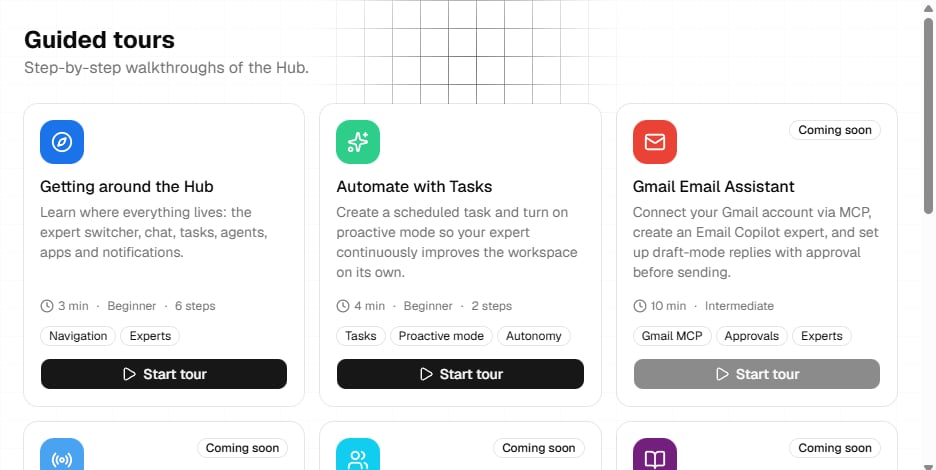
Open **Tours** to browse guided walkthroughs. Each card shows its estimated time, difficulty, tools, availability, and completion state.
Available tours can be started or restarted. A tour navigates to the relevant Hub page and highlights the target interface. Cards marked **Coming soon** cannot be started.
Current routes are `/tours` for the catalog and `/tour/:id` for a direct tour link.
## Onboarding
The authenticated onboarding flow is available at `/onboarding`. It asks for:
1. Workspace context, including region, industry, and an optional website
2. A first focus
3. A launch action for an agent, chat, tasks, or provider keys
You can skip onboarding and continue to the dashboard.
Your selected focus determines the destination of **Start primary flow**. From the launch plan, you can also add a provider key or open B-Bot chat.
Some tour content, news controls, and onboarding text may currently fall back to English even when another interface language is selected.
For ongoing preferences, see [Settings](/essentials/settings). For the main starting page, see [Dashboard](/essentials/dashboard).
## News
Open **News** to browse product updates, announcements, and release notes.
You can:
* Search titles, summaries, and content
* Filter by announcements, releases, or updates
* Open pinned items
* Move between result pages when pagination is available
* Open an item to read its detail page
News combines built-in announcements with items loaded from the content service. If the remote request fails, the page reports the error and can continue showing local announcements.
Current routes are `/news` for the list and `/news/:newsId` for an item.
## Tours
Open **Tours** to browse guided walkthroughs. Each card shows its estimated time, difficulty, tools, availability, and completion state.
Available tours can be started or restarted. A tour navigates to the relevant Hub page and highlights the target interface. Cards marked **Coming soon** cannot be started.
Current routes are `/tours` for the catalog and `/tour/:id` for a direct tour link.
## Onboarding
The authenticated onboarding flow is available at `/onboarding`. It asks for:
1. Workspace context, including region, industry, and an optional website
2. A first focus
3. A launch action for an agent, chat, tasks, or provider keys
You can skip onboarding and continue to the dashboard.
Your selected focus determines the destination of **Start primary flow**. From the launch plan, you can also add a provider key or open B-Bot chat.
Some tour content, news controls, and onboarding text may currently fall back to English even when another interface language is selected.
For ongoing preferences, see [Settings](/essentials/settings). For the main starting page, see [Dashboard](/essentials/dashboard).