> ## Documentation Index
> Fetch the complete documentation index at: https://docs.b-bot.space/llms.txt
> Use this file to discover all available pages before exploring further.
# Settings
> Choose a theme and language, and manage web push
# Settings
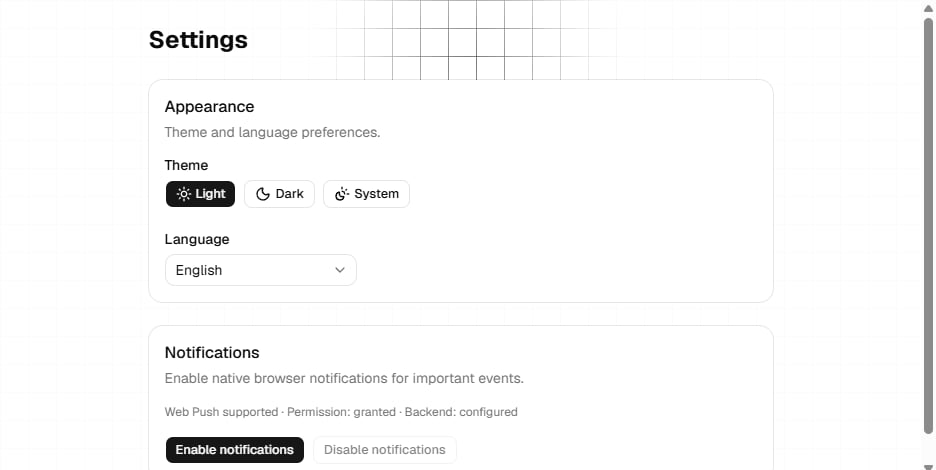
The current Settings page contains appearance, language, and web push controls.
 ## Theme
Choose one of these themes:
* **Light**
* **Dark**
* **System**, which follows your operating system preference
The selection applies to the Hub interface.
## Language
Choose **English**, **Deutsch**, **Français**, or **Italiano**.
Some parts of the current Hub are not localized yet and may fall back to English.
## Web push notifications
The notifications card reports:
* Whether the browser supports web push
* The browser's current notification permission
* Whether the notification service is configured
Select **Enable notifications** to request browser permission and create a subscription. Select **Disable notifications** to remove the current subscription.
If the browser does not support web push, the enable action is unavailable. If permission is denied or the notification service is not configured, enabling notifications may fail and the Hub displays the reported reason.
## Settings managed elsewhere
* Change your avatar and view identity-provider data under [Profile](/essentials/profile).
* Manage provider and B-Bot API keys under [Keys](/essentials/provider-keys).
* Manage companies and subscriptions under [Company and billing](/essentials/company-billing).
## Theme
Choose one of these themes:
* **Light**
* **Dark**
* **System**, which follows your operating system preference
The selection applies to the Hub interface.
## Language
Choose **English**, **Deutsch**, **Français**, or **Italiano**.
Some parts of the current Hub are not localized yet and may fall back to English.
## Web push notifications
The notifications card reports:
* Whether the browser supports web push
* The browser's current notification permission
* Whether the notification service is configured
Select **Enable notifications** to request browser permission and create a subscription. Select **Disable notifications** to remove the current subscription.
If the browser does not support web push, the enable action is unavailable. If permission is denied or the notification service is not configured, enabling notifications may fail and the Hub displays the reported reason.
## Settings managed elsewhere
* Change your avatar and view identity-provider data under [Profile](/essentials/profile).
* Manage provider and B-Bot API keys under [Keys](/essentials/provider-keys).
* Manage companies and subscriptions under [Company and billing](/essentials/company-billing).